
Choosing GPU infrastructure for LLM training in 2026: NVIDIA H100 vs. H200 vs. B200 vs. B300
Compare NVIDIA's H100, H200, and B200 GPUs for LLM training in 2026. Learn which GPU is best for your AI models based on memory, performance, and scale.
Choosing the hardware to train a large language model (LLM) is a decision made under constraints, not a shopping trip for the biggest number. Memory ceilings, power density, and real availability all narrow the field before performance ever enters the conversation.
The instinct is simple: newer GPUs are faster, so buy the newest. They're also harder to get and hungrier for power and cooling. And raw speed says little about whether a GPU fits the workload. Memory capacity, architecture, and long-context behavior often matter more than peak throughput.
The lineup now spans four options: the H100 and H200 on NVIDIA's Hopper architecture, and the B200 and newly shipping B300 (Blackwell Ultra) on Blackwell. Each makes a different tradeoff. This guide is for teams deciding which one matches their training, fine-tuning, and inference workloads, and living with the reality that the newest GPU isn't automatically the right one. The right one matches the work.
NVIDIA’s Latest GPU Lineup
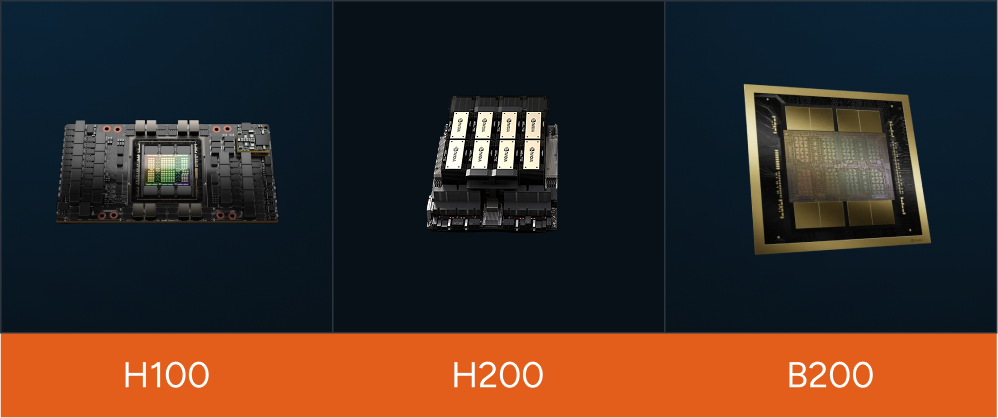
NVIDIA H100 (Hopper)
Released in 2022, the H100 moved LLM training forward with:
- 80 GB HBM3 memory (3.35 TB/s bandwidth)
- FP8 precision support, delivering ~2 PFLOPS compute
- A large step up over the prior A100 generation
The H100 became the reliable default for a wide range of AI workloads, and it still is.
NVIDIA H200 (Enhanced Hopper)
Launched in 2024–25, the H200 keeps the Hopper architecture and adds memory:
- 141 GB HBM3e memory (~4.8 TB/s bandwidth)
- Same FP8 compute as the H100 (~2 PFLOPS)
- Better suited to memory-intensive models and longer contexts
By fitting larger batches into memory, the H200 lifts throughput up to 1.6x the H100 without changing the compute ceiling.
NVIDIA B200 (Blackwell)
The B200 moved to Blackwell in 2025 with a dual-die design that presents as a single GPU:
- 192 GB HBM3e memory (~8.0 TB/s bandwidth)
- ~4.5 PFLOPS FP8 dense compute, up to ~9 PFLOPS at FP4
- Second-generation Transformer Engine with FP4 precision for inference
- 5th-generation NVLink (1.8 TB/s) for multi-GPU scaling
- 1,000W thermal design power (TDP)
The tradeoff is power. The B200 delivers up to ~4x the H100's training throughput, but at 1,000W per GPU it pushes rack density and cooling past what most facilities were built for.
NVIDIA B300 (Blackwell Ultra)
The B300, shipping since late 2025, is a Blackwell Ultra refinement of the B200 rather than a general-purpose upgrade:
- 288 GB HBM3e memory in 12-high stacks, ~8 TB/s bandwidth
- ~15 PFLOPS dense FP4 compute, up from the B200's ~9
- FP64 throughput de-emphasized in favor of FP4
- 5th-generation NVLink (1.8 TB/s)
- 1,400W TDP
The B300 trades FP64 for memory capacity and FP4 dense throughput. That makes it the memory-and-inference play, strong for long-context serving and the largest models, and the wrong pick for double-precision work. For FP64-heavy workloads, the B200 stays the better choice. Supply is still constrained.
Quick Comparison
Key Considerations for Choosing GPUs
Memory Capacity & Bandwidth
Long-context models lean hard on GPU memory. Every additional thousand tokens of context and every billion parameters has to live somewhere.
- H100 (80 GB): Fine for models up to ~70B; strains on extreme contexts.
- H200 (141 GB): Nearly double the H100, comfortable with 100B+ models and longer contexts.
- B200 (192 GB): Handles very large models and long contexts at ~8 TB/s bandwidth.
- B300 (288 GB): The most headroom, built for 128K+ token contexts and the largest models with fewer GPUs.
Compute Performance & Precision (FP8 to FP4)
Precision support is where Blackwell separates from Hopper.
- H100: Introduced FP8 training, doubling throughput over FP16.
- H200: Same compute as the H100; the added memory removes bottlenecks that otherwise cap real throughput.
- B200: ~4.5 PFLOPS FP8 dense plus FP4 for inference, roughly 2–3x H100/H200 training in practice.
- B300: ~15 PFLOPS dense FP4, up from the B200's ~9, but with FP64 de-emphasized. Built for FP4 serving and memory-bound work, not double precision.
Architectural Differences: Hopper vs. Blackwell vs. Blackwell Ultra
- Monolithic (H100/H200) vs. dual-die (B200/B300): The Blackwell parts present two dies as one GPU, adding compute and memory without complicating the programming model.
- Blackwell Ultra (B300): A refinement of the B200 that trades FP64 for memory capacity and FP4 throughput, not a clean-sheet redesign.
- NVLink: NVLink 5 (1.8 TB/s) on the B200/B300 doubles the H100's interconnect, which is what lets multi-GPU training scale.
Suitability by Workload
Pre-training Large Models (100B+ parameters)
- B300: Highest memory (288 GB) means the fewest GPUs for the largest models.
- B200: Strong here too, and the pick when FP64 matters.
- H200: Better than the H100 for model size and sequence length.
- H100: Still reliable, but expect more GPUs and longer training runs.
Fine-Tuning and Reinforcement Learning From Human Feedback (RLHF)
- H200: A balanced pick, with enough memory for long-context iteration.
- H100: Usually sufficient.
- B200/B300: The choice when rapid iteration or very large context windows are in play.
Long-Context Inference and Retrieval-Augmented Generation (RAG)
- B300: leads on memory (288 GB) and FP4 dense throughput for serving.
- H200 and B200: Both strong, and well ahead of the H100 on large-context inference.
Performance Benchmarks: Real-World Estimates
- Inference: a single B200 roughly matches 3–4 H100s. Across the Blackwell generation, the B200 and B300 deliver up to 11–15x LLM throughput per GPU versus Hopper, according to Exxact.
- Training: in MLPerf Training v5.0, Blackwell delivered about 2.2x more performance per GPU than Hopper at the same 512-GPU scale; in typical practice expect around 2.5x the H100/H200 depending on the workload.
- Multi-GPU scaling: NVLink 5 at 1.8 TB/s improves scaling efficiency across nodes, the difference between linear and sublinear scaling when training trillion-parameter models.
- B300: higher FP4 dense throughput (~15 PFLOPS vs the B200's ~9) favors long-context inference and serving, and its 288 GB of memory reduces the GPU count needed for the largest models.
Availability
Compute performance determines training speed.
Cloud vs. On-Premise
Renting gives immediate, flexible access and makes sense for prototyping and bursty demand. The catch shows up at scale: long-term commitments and one-size-fits-all instance types stop fitting once the workload has a shape of its own.
Owning trades that flexibility for control, and can win at sustained high utilization, if the facility can actually power and cool the hardware. With B200 and B300 nodes drawing 1,000–1,400W per GPU, that "if" is doing real work. On-premise viability lives or dies on power availability, cooling capacity, and how consistently the GPUs stay busy.
Power, Cooling, and Infrastructure Readiness
The new silicon changes the building, not just the server. At 700W the H100 already pressed many facilities. At 1,000W for the B200 and 1,400W for the B300, air cooling stops being an option and direct liquid cooling becomes mandatory. Most legacy data centers can't support this density without a retrofit.
The constraint is rack power. A single node of eight B300s draws more than 11 kW for the GPUs alone, before networking, storage, and overhead. Fill a rack with these and power density climbs past what traditional 5–10 kW/rack designs were engineered to deliver or cool.
Consider this: a team secures 64 B300s, expecting to stand up eight nodes fast. The GPUs arrive in weeks. But the facility tops out at 12 kW/rack with no liquid loop, so each rack holds one node instead of four, and cooling retrofits push the timeline out 18–24 months. Readiness, not GPU availability, becomes the bottleneck.
How WhiteFiber Approaches GPU Infrastructure
Here's the judgment we keep coming back to: GPU count alone doesn't equal performance. A B300 starved for data by under-provisioned networking, or throttled by unstable cooling, returns a fraction of its potential. The GPU is one component in a system that only performs when every layer is matched.
That's how we build. WhiteFiber Cloud pairs high-density GPUs with high-throughput Ethernet and InfiniBand fabrics and storage sized to keep the GPUs fed, engineered as one system rather than assembled from parts. We provision power for the density these chips actually draw, 1,000W to 1,400W per GPU, and design cooling around it from the start instead of retrofitting later. Customers get visibility into power, cooling, and environmental telemetry, and they work directly with engineers rather than ticket queues.
None of that removes the tradeoffs. It makes them explicit, so the decision is deliberate. Pick the GPU that matches the workload, memory for long context, FP4 for serving, FP64 where precision is non-negotiable, then run it on infrastructure engineered to keep it fed. That second half is where sustained utilization is won or lost, and it's the half most teams underestimate.

FAQ:
What's the difference between the B200 and the B300?
The B300 (Blackwell Ultra) adds memory, 288 GB versus the B200's 192 GB, and higher FP4 dense compute for inference and long context, but de-emphasizes FP64. The B200 stays the better choice where double-precision performance matters.
Which NVIDIA GPU is best for training large LLMs (100B+ parameters)?
The B300 and B200 reduce the GPU count needed for the largest models thanks to their memory and compute. The H200 is a strong option, and the H100 still works with more units and longer training runs.
Should I choose the B300 or the B200?
It depends on the workload: the B300's extra memory and FP4 throughput suit long-context inference and the largest models, while the B200 remains the stronger choice where FP64 matters.
Can existing data centers run B200 and B300 GPUs?
Often not without a retrofit. At 1,000–1,400W per GPU, these parts require direct liquid cooling and higher rack density than most legacy facilities were built for. Readiness is frequently the real constraint, not GPU availability.



.svg)
